
Visual Workflow Designer & Execution Engine
KramaFlow lets you build, connect, configure, and execute workflows visually on Windows. From HTTP calls to SQL queries, C# scripting to file operations — automate anything step by step.
"Krama" — Sanskrit for succession, order, and step-by-step progression toward a goal.
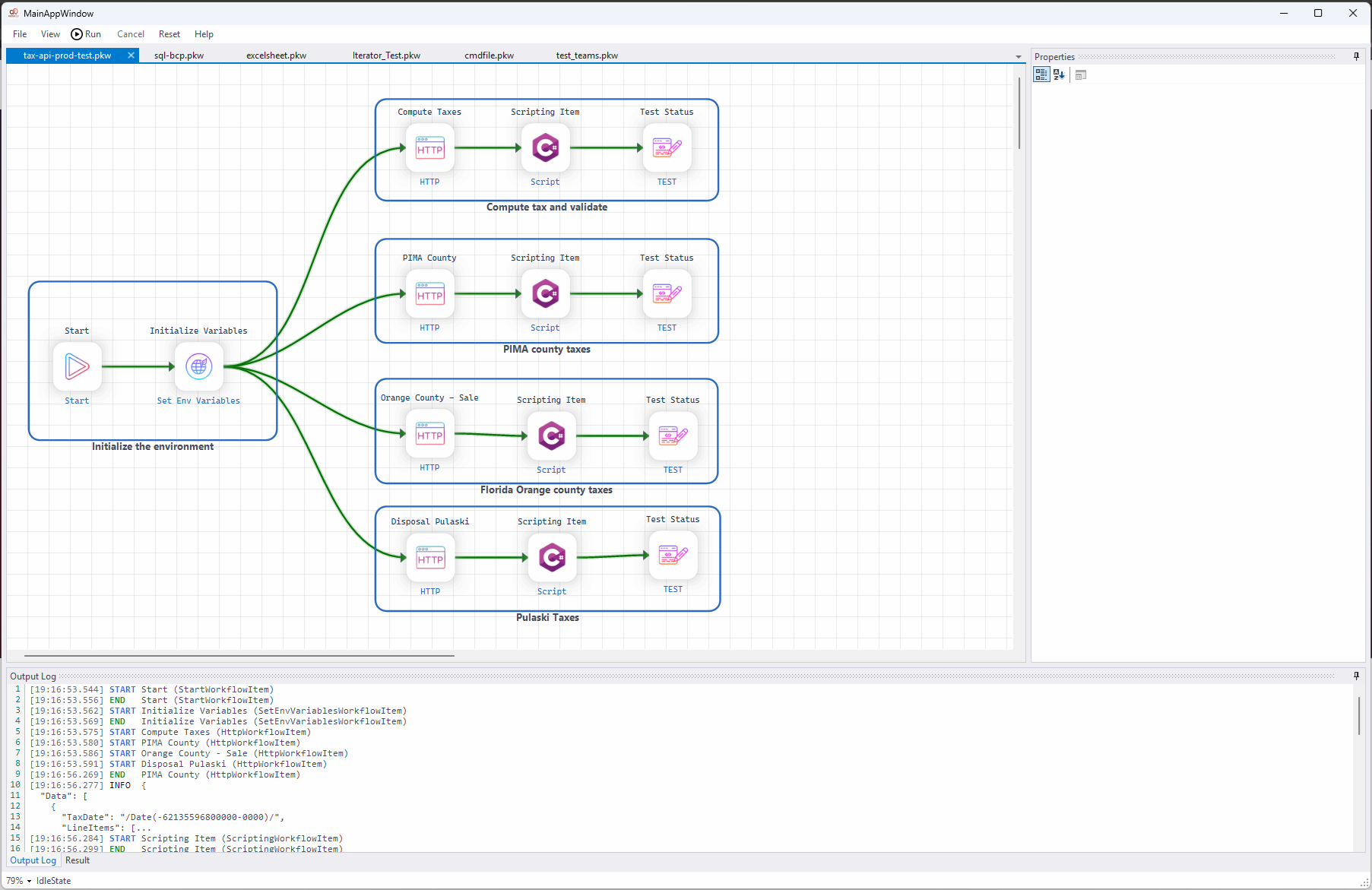
Everything you need to automate workflows
KramaFlow combines a rich visual designer with a powerful execution engine so you can build and run sophisticated automations without writing infrastructure code.
Visual Canvas Designer
Drag, drop, multi-select, lasso, and resize workflow items on a rich interactive canvas. Connect nodes visually with success (green) or failure (red) paths.
28 Workflow Item Types
HTTP requests, SQL queries, stored procs, C# scripting, FTP, Excel/CSV, Teams notifications, conditional branching, loops, iterators, and more.
Real-time Execution Engine
Execute workflows with F5. Follow item traces in the output log, inspect JSON results per step, and track success/failure flows live.
Environment Variables
Share values between steps using `{{variableName}}` templates in URLs, SQL, scripts, and file paths. Set vars via Initialize Environment or C# scripting.
Save & Load .pkw Files
Workflows are saved as compressed JSON `.pkw` files containing item definitions, connectors, properties, and canvas layout. Share and reuse workflows easily.
Extension Support
Extend KramaFlow with plugin-based `IWorkflowExtension` types. Add custom items via `Workflow › Extensions` and configure them through the PropertyGrid.
Undo / Redo
Full undo/redo support for all editing actions. Ctrl+Z and Ctrl+Y keep your design history intact during complex workflow construction.
Zoom & Pan Canvas
Ctrl + mouse wheel to zoom in/out. Status-bar zoom dropdown for precise control. Pan freely across large multi-branch workflows.
From canvas to execution in 4 steps
No infrastructure code. No YAML pipelines. Just visual, connected steps that run instantly.
Add a Start Item
Right-click the canvas → Workflow → Start. Every workflow must begin with a Start item which clears the environment before execution.
Add & Connect Items
Right-click to add items. Drag from a node's green (success) or red (failure) hotspot to connect to the next item. Build any branching logic you need.
Configure Properties
Select any item and edit its properties in the right-side PropertyGrid. Use {{variableName}} templates in URLs, SQL, scripts, and file paths.
Run & Inspect
Press F5 (or Run menu) to execute. Watch the Execution Log for real-time traces. Click any item to inspect its JSON output in the Output tab.
28 item types — built for real automations
Every step you need from HTTP calls and database queries to scripting, file I/O, and Teams notifications — all available on the visual canvas.
- 🌐HTTP RequestREST / SOAP / any URL
- 🗄SQL ItemRaw SQL query
- 📦Stored ProcedureNamed proc + params
- 📋SQL Bulk CopyBulk JSON → SQL table
- 📡FTP RequestUpload / Download / Delete
- { }C# Scripting ItemFull Roslyn C# execution
- JSJavaScript ItemInline JS via engine
- ⑂Conditional Itemtrue/false branch
- ≡Evaluate ScriptScripting for evaluation
- ✓Test StatusAssert & test scripting
- ▶StartWorkflow entry point
- ↻Iterator ItemForeach over array
- 🔁Loop ItemFixed count repeat
- ⊕Junction ItemMerge parallel branches
- ⏱DelayPause N milliseconds
- 📂Open FileRead file as text
- 💾Save To FileWrite content to disk
- 📊Xlsx FileRead Excel → JSON
- 📄CSV FileRead CSV → JSON
- ⌨Bat FileRun batch scripts
- 💬Teams NotificationSend Teams webhook card
- { }Json DisplayPretty-print JSON
- </>Xml DisplayPretty-print XML
- ⊞Table DisplayJSON list → table
- 🔍Display EnvironmentInspect env variables
- ⚙Initialize EnvironmentSet key-value vars
- 🧩Extension WrapperIWorkflowExtension plugin
Stay in flow with keyboard-first controls
KramaFlow is designed for power users. Common operations — from running workflows to undoing mistakes — are all one keystroke away.
Right-click context menus surface clipboard-aware actions. Double-click any item to open its editor. Double-click a connector label to rename it inline.
Start automating today
KramaFlow is free and runs natively on Windows with .NET 8. Build, connect, and execute workflows in minutes — no cloud account required.
Verify Download
Algorithm Hash: MD5 1DACCE4F41608B6266DDAD998DBEA4B8